

Top 10 Saree with Jewellery AI Prompts for Exquisite Embellishment Details
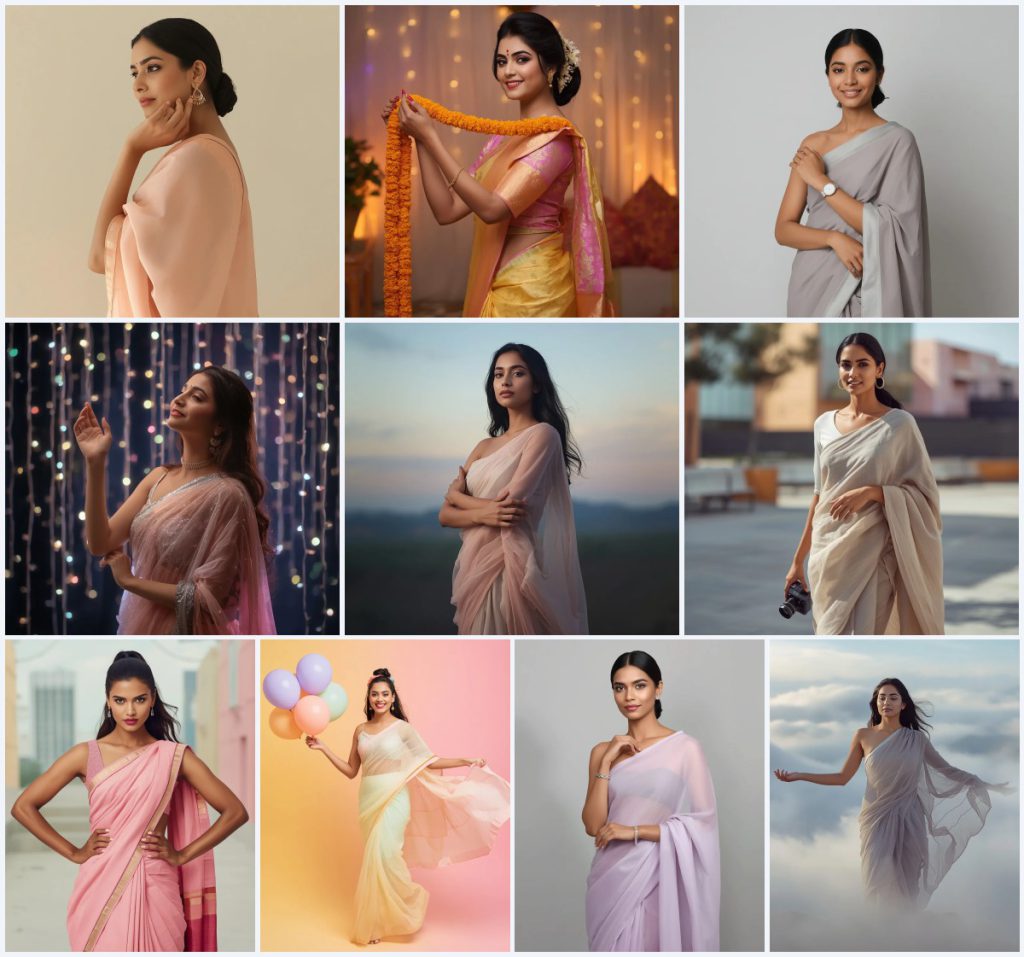
The collection 'Top 10 Saree with Jewellery AI Prompts for Exquisite Embellishment Details' offers a curated set of image-generation ideas that celebrate the refined beauty of Indian women in pastel sarees. Each prompt focuses on a distinct mood—ranging from festive marigolds to dreamy fairy lights—while consistently highlighting delicate jewellery, soft fabrics, and controlled lighting. This article unpacks the shared visual language across all ten cards, explaining how to interpret the recurring elements and turn them into polished AI portraits.
Across titles such as 'Poised Grace: Indian Woman Adjusting Jewelry in Pastel Drape' and 'Dreamy Enchantment: Indian Woman Amidst Fairy Lights,' the collection emphasizes graceful poses, minimalist accessories, and ethereal color palettes. The prompts avoid heavy ornamentation, instead drawing attention to details like a simple gold earring, a minimalist silver watch, or a delicate bracelet. By reading this guide, you will understand how to use these prompts effectively, choose the right tools, and troubleshoot common AI rendering issues unique to saree-and-jewellery imagery.
What this saree-with-jewellery prompt collection is asking for
This collection of ten prompts requests full-body images of Indian women in pastel sarees, each interacting with a specific jewellery piece or accessory. The emphasis is on understated elegance, soft fabric textures like georgette, chiffon, organza, and silk, and controlled, diffused lighting. Every prompt specifies a refined posture, a calm or joyful expression, and a clean pastel background that keeps the focus on the saree drape and the jewellery detail.
- A poised Indian woman in a solid pastel peach georgette saree with a simple gold border, adjusting a pair of gold earrings.
- A festive woman in a pastel yellow silk saree with gold Zari work, holding a marigold garland draped over her arms.
- A sophisticated figure in a plain dove grey georgette saree, adjusting a minimalist silver watch on her wrist.
- A dreamy character in a shimmering pastel pink and silver net saree, surrounded by twinkling pastel fairy lights.
- An elegant woman in a sheer pale pink and cream chiffon saree, standing outdoors during twilight with arms gently folded.
- A vibrant young woman in a gradient pale yellow to blush pink organza saree, holding pastel lavender, mint, and peach balloons.
The visual scene these saree-and-jewellery prompts create
The shared scene across these prompts is a serene, minimalist environment where the subject stands in a full-body frame against soft pastel backdrops. In 'Poised Grace,' the woman is placed before 'a clean, minimal pastel cream wall' with 'diffused, soft lighting' that flatters her glowing skin. Similarly, 'Sophisticated Simplicity' uses 'a clean, plain pastel grey wall' to mirror the dove grey saree, reinforcing the minimalist aesthetic. The lighting is consistently described as soft and diffused, avoiding harsh shadows that might distract from the jewellery.
Outdoor prompts introduce natural elements without overwhelming the subject. 'Elegance in Twilight' sets the woman outdoors during twilight with 'a blurred, pastel-toned sky' and 'soft, diffused natural light,' while 'Dreamy Cloudscape' places her on a mountain peak surrounded by 'soft, ethereal clouds' and 'misty grey and pale lavender' hues. These clauses ensure the background remains dreamy and unobtrusive, letting the saree's texture and the jewellery's subtle shimmer take center stage.
Why this saree-with-jewellery collection works for AI image generation
This prompt set is effective because it combines specific cultural garment details with universal aesthetic principles like soft lighting and minimal composition. The consistent use of pastel colors, refined poses, and single jewellery focal points reduces visual clutter, making it easier for AI models to produce coherent, high-quality results. The prompts also balance tradition with modernity, appealing to users seeking elegant Indian fashion imagery without overwhelming ornamentation.
- The limited color palette of pastels and neutrals prevents color bleeding and helps AI maintain harmony across the saree, skin, and background.
- Each prompt isolates one jewellery action—adjusting an earring, a watch, or a bracelet—giving the AI a clear, singular gesture to render accurately.
- Soft, diffused lighting descriptions minimize harsh shadows on the face and fabric folds, resulting in smoother, more photorealistic skin and textile textures.
Three artistic styles you can apply to these saree prompts
While the prompts already contain strong aesthetic cues, you can enhance them by appending style modifiers that stay within the elegant and dreamy mood. Three effective styles are editorial fashion photography, soft-focus ethereal painting, and minimalist modern portraiture. Each style respects the prompt's original pastel palette and jewellery focus, adding a distinct visual signature without breaking the scene's serenity.
- Editorial fashion photography: This style sharpens fabric textures like georgette and chiffon, adds a subtle vignette, and emphasizes the jewellery's metallic sheen, perfect for 'Poised Grace' or 'Sophisticated Aura'.
- Soft-focus ethereal painting: Applying a painterly, soft-focus effect enhances the dreamy quality of prompts like 'Dreamy Enchantment' and 'Dreamy Cloudscape,' making the fairy lights and clouds appear more luminous and fluid.
- Minimalist modern portraiture: This style strips away any remaining background detail, using a plain studio backdrop and precise lighting to highlight the saree's drape and the jewellery's form, ideal for 'Sophisticated Simplicity' or 'Confident Stance'.
How to generate these saree-with-jewellery images step by step
Generating these images requires careful prompt handling and post-generation checks to ensure the jewellery and fabric details render correctly. Start by copying one full prompt from the collection, such as 'Poised Grace,' and paste it into your chosen AI tool. If the tool supports reference images, upload a photo of a similar pastel saree or jewellery piece to guide the output. After generating, inspect the hands, face, and the main jewellery object for distortions before upscaling or sharing.
- Copy the full prompt text. Select one complete prompt, for example 'Poised Grace: Indian Woman Adjusting Jewelry in Pastel Drape,' and copy every detail including the lighting and background clauses.
- Upload a reference photo if needed. If your AI tool accepts image inputs, upload a clear photo of a pastel georgette saree or a simple gold earring to help the model understand fabric fall and metal reflection.
- Generate the initial image batch. Run the prompt and produce 3-4 variations to compare how different seeds handle the saree pleats, the jewellery adjustment gesture, and the soft lighting.
- Check the hands and fingers. Zoom in on the hand adjusting the earring, watch, or bracelet. Ensure fingers are proportional and the jewellery sits naturally against the skin without merging.
- Examine the face and expression. Verify that the eyes, kohl, bindi (if mentioned), and lip color match the prompt's description. Look for symmetry and a calm, focused, or joyful expression as specified.
- Inspect the main jewellery object. Focus on the earring, watch, bracelet, or garland. Confirm that the metal texture, gemstone clarity, or flower shapes are distinct and not blurred into the saree or background.
Choosing the right reference photo for these saree prompts
A well-chosen reference photo can dramatically improve the accuracy of fabric draping and jewellery rendering in these images. The reference should match the prompt's saree type, color, and lighting conditions as closely as possible. Avoid overly busy or high-contrast images that might confuse the AI's interpretation of the soft, diffused aesthetic.
- Use a full-body reference of a woman in a pastel georgette or chiffon saree, standing against a plain cream or grey wall, to guide the AI on fabric flow and pleat formation.
- Include a close-up of the specific jewellery piece, such as a minimalist silver watch or a pair of simple gold earrings, to ensure the metallic highlights and scale are rendered correctly.
- Select a photo taken under soft, diffused natural light or studio lighting to match the prompt's lighting descriptions and avoid introducing harsh shadows that alter the mood.
Best AI tools for generating these saree-and-jewellery images
Different AI image generators handle fabric textures, skin tones, and jewellery details with varying levels of realism. The table below compares four popular tools based on their accessibility, typical output realism, and specific usefulness for this prompt collection. Each tool can produce beautiful results, but your choice may depend on how much control you need over lighting and metallic reflections.
| Tool | Access | Typical realism | Useful here for |
|---|---|---|---|
| ChatGPT | DALL·E integration, subscription-based | Moderate to high, good with fabric and soft lighting | Rendering the soft pastel peach georgette saree and the diffused, soft lighting described in 'Poised Grace'. |
| Google Gemini | Free and paid tiers, Imagen integration | High, strong with human figures and cultural attire | Capturing the intricate gold Zari work on the pastel yellow silk saree in 'Traditional Festivity'. |
| Leonardo AI | Freemium with daily credits, web-based | High, excellent for cinematic and ethereal styles | Creating the ethereal glow and shimmering sequin embellishments on the pastel pink and silver net saree in 'Dreamy Enchantment'. |
| Midjourney | Paid subscription, Discord-based | Very high, top-tier for textures and lighting subtlety | Producing the translucent, otherworldly quality of the sheer pastel chiffon saree in misty grey and pale lavender in 'Dreamy Cloudscape'. |
Three tips for better results with these saree-and-jewellery prompts
Small adjustments to your workflow can significantly enhance the final image quality when working with these prompts. Focus on preserving the delicate textures of materials like georgette and organza, and ensure the jewellery remains the focal point. These tips address common pitfalls and help you achieve the refined, elegant look the collection intends.
- Emphasize the pastel peach georgette fabric by adding a negative prompt for 'heavy embroidery' or 'dark shadows' if the AI tends to over-texture the plain saree in 'Poised Grace'.
- For the marigold garland in 'Traditional Festivity,' specify 'individual marigold flowers with visible petals' in your positive prompt to prevent the AI from rendering a blurred orange mass.
- When generating the pastel organza saree with balloons in 'Vibrant Youth,' use a prompt weight on 'translucent organza layers' to keep the fabric light and airy, avoiding a stiff, opaque look.
Common issues when generating these saree-with-jewellery images
Even with detailed prompts, AI models can misinterpret certain elements, leading to flawed outputs. The table below lists four frequent issues encountered with this collection, along with specific changes to make in your prompt or settings. These adjustments help correct errors without altering the core elegant aesthetic.
| Issue | What to change |
|---|---|
| The jewellery merges with the skin or saree | Add 'distinct metallic edges on the gold earring' or 'clear separation between the silver bracelet and skin' to your prompt to define boundaries. |
| Fingers appear fused or misshapen when adjusting the watch or earring | Include 'well-defined, separate fingers gently touching the minimalist silver watch' and use a negative prompt for 'fused fingers, extra digits'. |
| The pastel background overpowers the subject or bleeds into the saree | Specify 'sharp focus on the woman, clean pastel cream wall slightly out of focus' to create depth and prevent color spill. |
| The marigold garland looks like a solid orange scarf | Revise the prompt to include 'detailed marigold garland with distinct flower heads and green stems' and increase the weight on 'floral texture'. |
Frequently Asked Questions
Can I mix elements from different prompts in this collection, like using the fairy lights from 'Dreamy Enchantment' with the dove grey saree from 'Sophisticated Simplicity'?
Yes, you can combine elements, but keep the pastel palette and minimal jewellery focus intact. For example, a dove grey georgette saree surrounded by soft pastel fairy lights would maintain the dreamy mood. Just ensure your prompt includes both the saree fabric detail and the lighting description to guide the AI consistently.
Why does my AI sometimes generate a heavily embroidered saree when the prompt specifies a plain pastel georgette?
AI models often associate Indian sarees with heavy embellishments. To counter this, add negative prompts like 'no embroidery, no heavy Zari work, no sequins' and positively reinforce 'plain solid pastel peach georgette with only a simple gold border' to steer the output toward minimalism.
How can I ensure the jewellery adjustment gesture looks natural and not awkward?
Describe the hand position precisely, for example 'one hand delicately adjusting a simple pair of gold earrings, fingers gently touching the earlobe.' If the AI struggles, use a reference photo of a similar pose and add 'natural hand posture, relaxed fingers' to your prompt to improve anatomical accuracy.
Conclusion
The 'Top 10 Saree with Jewellery AI Prompts for Exquisite Embellishment Details' collection provides a versatile foundation for creating elegant, culturally rich AI portraits. By understanding the shared visual language of pastel fabrics, soft lighting, and focused jewellery interactions, you can generate consistent, high-quality images across different moods and settings. Applying the style suggestions, step-by-step workflow, and troubleshooting tips from this guide will help you avoid common pitfalls and refine each output. Whether you are drawn to the serene twilight elegance or the vibrant youthful energy of these prompts, the key lies in preserving the delicate balance between the saree's texture and the jewellery's subtle gleam.
Remember to edit only a photo you have the legal right to modify, ensuring your creative work respects the original source and any applicable permissions.