

New 10 Vintage Couple AI Prompts for Classic Car Dates with Retro Aesthetics
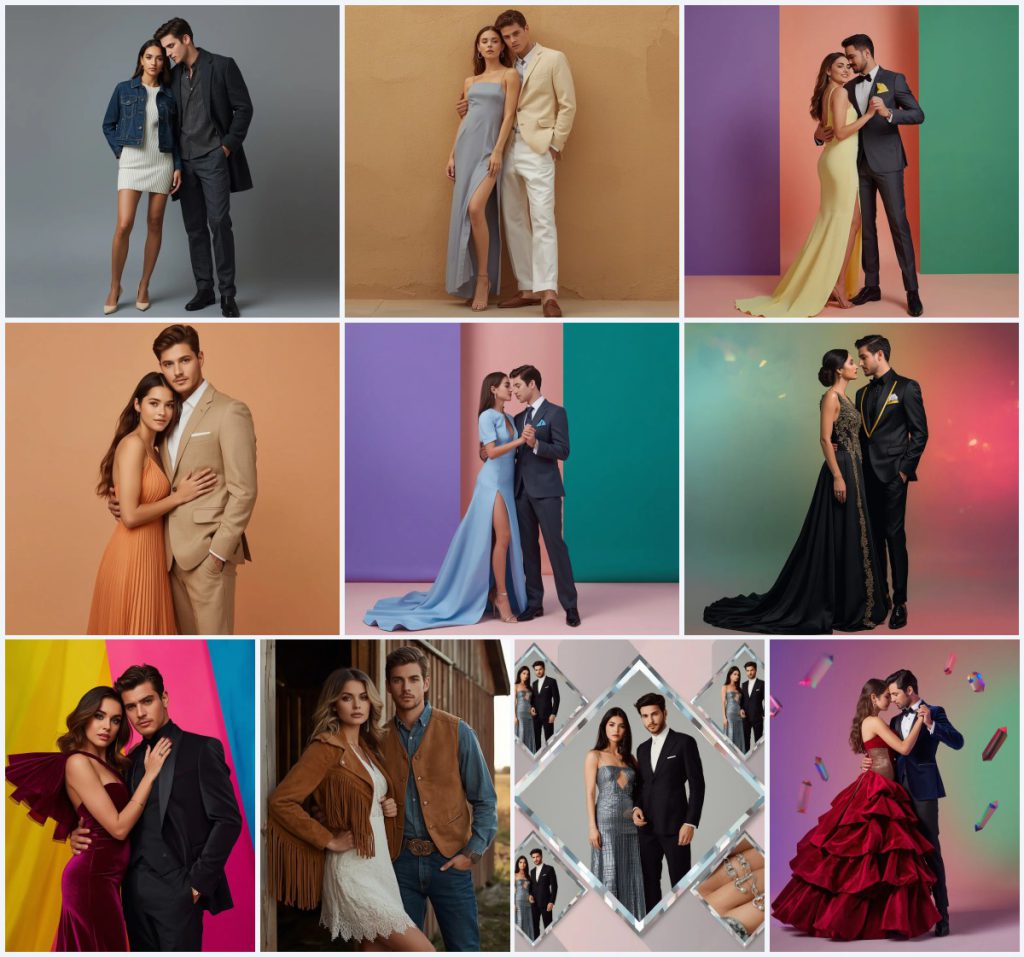
This curated set of ten vintage couple AI prompts brings the romance of classic car dates and retro aesthetics into your creative workflow. Each prompt is designed to generate elegant, high-fashion couple portraits with distinct color palettes, luxurious fabrics, and cinematic lighting, making them perfect for lifestyle reels, editorial shoots, or personal art projects.
From a couple in sophisticated urban denim against a cold grey backdrop to a dramatic red carpet pose with neon color-block panels, these prompts cover a wide spectrum of moods and styles. Whether you want a warm autumn scene with linen suits or a diamond-cut collage of high-fashion looks, you'll find detailed guidance here to bring every image to life with AI tools.
What these vintage couple prompts are asking for
Across all ten prompts, the common thread is a romantic couple posed in full body or portrait, dressed in carefully described western outfits with specific colors, textures, and accessories. The backgrounds range from minimal cold grey walls to multicolor neon gradients, and every prompt emphasizes ultra-realistic skin textures, soft cinematic lighting, and high-resolution output like 8K or 4K. These are not casual snapshots but polished, editorial-style images meant to evoke luxury, elegance, and timeless romance.
- Full-body or close-up poses of a romantic couple with affectionate, serene, or intense expressions.
- Detailed outfit descriptions such as a dark denim jacket, white knit dress, charcoal wool overcoat, pastel yellow structured gown, or tan suede fringed jacket.
- Clean, minimal backgrounds: cold grey, soft pastel peach, warm sandstone wall, or multicolor neon blends.
- Cinematic lighting with soft diffusion, shallow depth of field, or global illumination.
- High-resolution output specified as 8K, 4K, or ultra HD with DSLR photography style.
- No text or watermarks, ensuring a clean, distraction-free final image.
The visual scene inside these retro couple images
Each prompt constructs a distinct romantic tableau. In the urban denim prompt, the couple stands against a "clean, minimal cold grey background" with "soft, diffuse cinematic lighting" that highlights their "ultra-realistic skin textures" and "natural fabric details." The warm autumn prompt places them against a "soft pastel peach background," where the woman's "chic western pastel orange pleated midi dress" and the man's "light tan linen suit" create a harmonious, sun-kissed palette. For the dramatic red carpet shot, the scene shifts to a studio with "sharp, random vertical color-block panels of neon yellow, hot magenta, and electric cyan," while the female model's "deep magenta velvet gown" adds tactile richness.
In the collage prompt, the scene is fragmented into a "sophisticated collage with diamond-cut frame patterns," where each segment showcases a different look: "the woman in a metallic silver gown, the man in a tailored black suit, and close-ups of their stylish modern accessories." This structured layout, with "realistic glass depth and soft pastel highlights," creates a multi-faceted narrative of luxury. Across all prompts, the consistent use of DSLR photography style and terms like "shallow depth of field" or "85mm lens" anchors the images in a high-end editorial reality.
Why these prompts work for classic car date aesthetics
These prompts excel because they combine timeless romance with precise visual instructions that AI models can interpret effectively. The detailed clothing descriptions, specific color choices, and cinematic lighting cues guide the generator toward a cohesive retro-glam aesthetic, while the emphasis on high resolution ensures professional-grade results. The variety across the set allows users to explore different moods, from soft and intimate to bold and dramatic, all within the same vintage-inspired theme.
- The prompts specify exact outfit colors and materials like 'charcoal wool overcoat' or 'pastel blue structured gown,' reducing ambiguity and improving consistency.
- Background descriptions such as 'clean multicolor setup blending neon violet, soft peach, and deep emerald' create visually striking contrasts that enhance the retro vibe.
- Cinematic terms like 'soft spotlight,' 'global illumination,' and 'shallow depth of field' direct the AI toward professional lighting and depth effects, elevating the final image quality.
Three artistic styles built into these prompts
The ten prompts inherently embrace three distinct artistic styles: editorial fashion photography, cinematic realism, and high-fashion collage. Every image is described with DSLR photography style, 8K resolution, and ultra-realistic textures, firmly placing them in the editorial realm. The use of cinematic lighting and dramatic poses adds a film-like quality, while the diamond-cut collage prompt introduces a structured, multi-panel approach that still maintains realistic glass depth and soft highlights. Each style is fully contained within the prompt, so you can generate images without needing to add external references.
- Editorial Fashion Photography: This style is evident in prompts like the elegant romantic couple in sophisticated urban denim, where the 'clean, minimal cold grey background' and 'distraction-free framing' mimic high-end lifestyle magazine shoots.
- Cinematic Realism: Prompts such as the romantic couple in elegant pastel yellow gala suits use 'soft cinematic lighting' and 'photorealistic, 8k resolution' to achieve a movie-still aesthetic with dramatic depth.
- High-Fashion Collage: The diamond cut frame collage prompt explicitly constructs a 'sophisticated collage with diamond-cut frame patterns,' combining multiple looks into one image with 'realistic glass depth and soft pastel highlights.'
How to generate these vintage couple images step by step
Creating these romantic couple portraits with AI is straightforward if you follow a structured process. Start by copying the full prompt text from the collection, then upload a reference photo if you want to match a specific couple's likeness or pose. Generate the image in your chosen AI tool, and carefully review the output for common AI artifacts like distorted hands, asymmetrical faces, or fabric glitches. Make adjustments to the prompt or regenerate as needed to achieve the ultra-realistic, editorial quality described in each prompt.
- Copy the prompt. Select one of the ten prompts, such as the elegant romantic couple in sophisticated urban denim, and copy the entire text exactly as written.
- Upload a reference photo. If your AI tool supports image input, upload a photo of a couple in a similar pose to guide the composition and facial features.
- Generate the image. Paste the prompt into your AI image generator and run it with settings optimized for high resolution and realism.
- Check hands and fingers. Examine the couple's hands for extra fingers, unnatural bending, or blending with clothing, which are common AI mistakes.
- Check faces and expressions. Ensure both faces have symmetrical features, natural expressions, and consistent skin textures without warping.
- Check main objects and fabrics. Verify that the outfits, such as the 'dark denim jacket' or 'metallic silver gown,' render with correct textures and no pattern bleeding.
Using a reference photo for these couple prompts
A reference photo can significantly improve the accuracy of the generated couple, especially if you want to replicate a specific pair's likeness or a particular pose. The prompts are designed to work with or without a reference, but providing one helps the AI maintain consistent facial features and body proportions. Choose a clear, well-lit photo that matches the described pose and background as closely as possible.
- Use a full-body reference photo if the prompt specifies a full-body pose, such as the couple in the warm autumn tailored suits against a pastel peach background.
- Ensure the reference photo has even, soft lighting to align with the 'soft cinematic lighting' requested in most prompts.
- Avoid busy backgrounds in your reference; a plain wall or studio backdrop works best to let the AI focus on the couple and the described scene.
Best AI tools for these retro couple prompts
Several AI image generators are well-suited for these prompts, each offering different strengths in realism, accessibility, and stylistic control. ChatGPT with image generation capabilities can handle detailed text prompts and reference images effectively. Google Gemini excels at high-resolution outputs with strong adherence to color and lighting cues. Leonardo AI provides fine-tuned models for cinematic and editorial styles, while Midjourney is renowned for its artistic quality and texture rendering. The table below compares these tools for this specific set.
| Tool | Access | Typical realism | Useful here for |
|---|---|---|---|
| ChatGPT | Subscription-based | High, with good texture detail | Rendering the 'ultra-realistic skin textures' and 'natural fabric details' in the denim prompt |
| Google Gemini | Free tier available, paid plans | Very high, excellent color accuracy | Capturing the 'neon violet, soft peach, and deep emerald' multicolor background in the gala suit prompts |
| Leonardo AI | Freemium with daily credits | High, strong cinematic output | Achieving the 'soft cinematic lighting' and 'shallow depth of field' in the sandstone wall prompt |
| Midjourney | Paid subscription | Exceptional, artistic realism | Creating the 'realistic glass depth and soft pastel highlights' in the diamond-cut collage prompt |
Three practical tips for better vintage couple images
To get the most out of these prompts, focus on the material details and lighting conditions that define the retro aesthetic. Small adjustments to your generation process can dramatically improve the realism and emotional impact of the final image. Pay attention to how the AI interprets fabric textures, color contrasts, and the couple's expressions, and don't hesitate to iterate on a prompt if the first result isn't perfect.
- Emphasize the 'dark denim jacket' and 'charcoal wool overcoat' by adding a weight or repetition in your prompt if the AI renders them as flat colors instead of textured fabrics.
- For prompts with 'multicolor gradient' backgrounds like the black silk glam outfits, generate a few variations and pick the one where the 'mint, amber, and magenta' blend most smoothly without harsh lines.
- When rendering the 'tan suede fringed jacket' in the barn setting, ensure the AI captures the fringed edges clearly by checking the output at full resolution and regenerating if the details blur into the background.
Common issues and fixes for these couple prompts
Even with detailed prompts, AI image generators can produce flawed results. Common problems include mismatched outfit colors, distorted facial features, and background artifacts that clash with the clean, editorial look. The table below outlines four frequent issues you might encounter with these vintage couple prompts and how to address them.
| Issue | What to change |
|---|---|
| The 'pastel yellow structured gown' renders as neon yellow or greenish | Add 'soft pastel yellow, no neon tones' to the prompt or adjust the color temperature settings in your AI tool |
| Faces appear asymmetrical or have mismatched expressions in the dramatic red carpet pose | Use a reference photo with a clear, front-facing couple and regenerate, or add 'symmetrical faces, matching serene expressions' to the prompt |
| The 'diamond-cut frame patterns' in the collage merge into a single blurry image | Specify 'distinct diamond-shaped segments with clear borders' and reduce the number of looks if the AI struggles with complexity |
| The 'metallic silver gown' lacks shine and looks like grey cotton | Add 'high-reflective metallic fabric, specular highlights' and use a tool like Midjourney with a style raw parameter for better material rendering |
Frequently Asked Questions
Can I mix elements from different prompts in this collection to create a custom vintage couple image?
Yes, you can combine elements like the 'clean, minimal cold grey background' from the urban denim prompt with the 'deep magenta velvet gown' from the red carpet prompt. Just ensure the lighting and style terms remain consistent, such as keeping 'soft cinematic lighting' throughout, to avoid visual clashes.
Why do some prompts specify 'absolutely no text, no watermarks,' and how do I ensure that?
AI models sometimes add random text or watermark-like artifacts to images. The phrase 'absolutely no text, no watermarks' instructs the generator to avoid this. If text still appears, use a negative prompt like '--no text, watermark' in tools like Midjourney, or crop it out in post-processing.
How can I make the couple's expressions more 'affectionate and serene' as described in the urban denim prompt?
Add specific facial cues to the prompt, such as 'soft smiles, eyes slightly closed, gentle touch on the shoulder.' Using a reference photo of a couple with the desired expression also helps the AI replicate the mood more accurately.
Conclusion
This set of ten vintage couple AI prompts offers a rich palette of retro aesthetics, from sophisticated urban denim to dramatic red carpet glamour and intricate diamond-cut collages. By following the detailed scene descriptions, leveraging the right AI tools, and applying the practical tips and fixes outlined here, you can consistently generate stunning, high-resolution couple portraits that feel both timeless and editorial. Whether for social media, personal projects, or professional portfolios, these prompts provide a versatile foundation for creative exploration in AI image generation.
Remember to only edit a photo you have the legal right to modify, such as one you own or have permission to use.