

New 10 AI Prompts for Women’s Inspiring Girl Prompt Stories
This collection of ten AI image prompts celebrates women's fashion through diverse, story-driven scenes. Each prompt captures a distinct mood, from the timeless elegance of 1950s Hollywood to the bold energy of a neon-lit dance floor, offering a rich playground for generating stunning, photorealistic portraits.
Designed for creators who want to explore character-driven imagery, these prompts blend specific wardrobe details, lighting, and settings to produce cohesive visual narratives. Whether you're aiming for editorial sophistication or playful party vibes, this set provides a versatile foundation for your next AI art project.
What this women's inspiring story prompt collection is asking for
This collection calls for full-body or medium shots of women in distinct fashion scenarios, each with a strong narrative hook. The prompts specify everything from fabric textures like lamé and satin to accessories such as cowboy hats and opera gloves, ensuring each image tells a complete style story. The AI is guided to produce photorealistic, 8k-quality visuals with carefully described lighting and backgrounds.
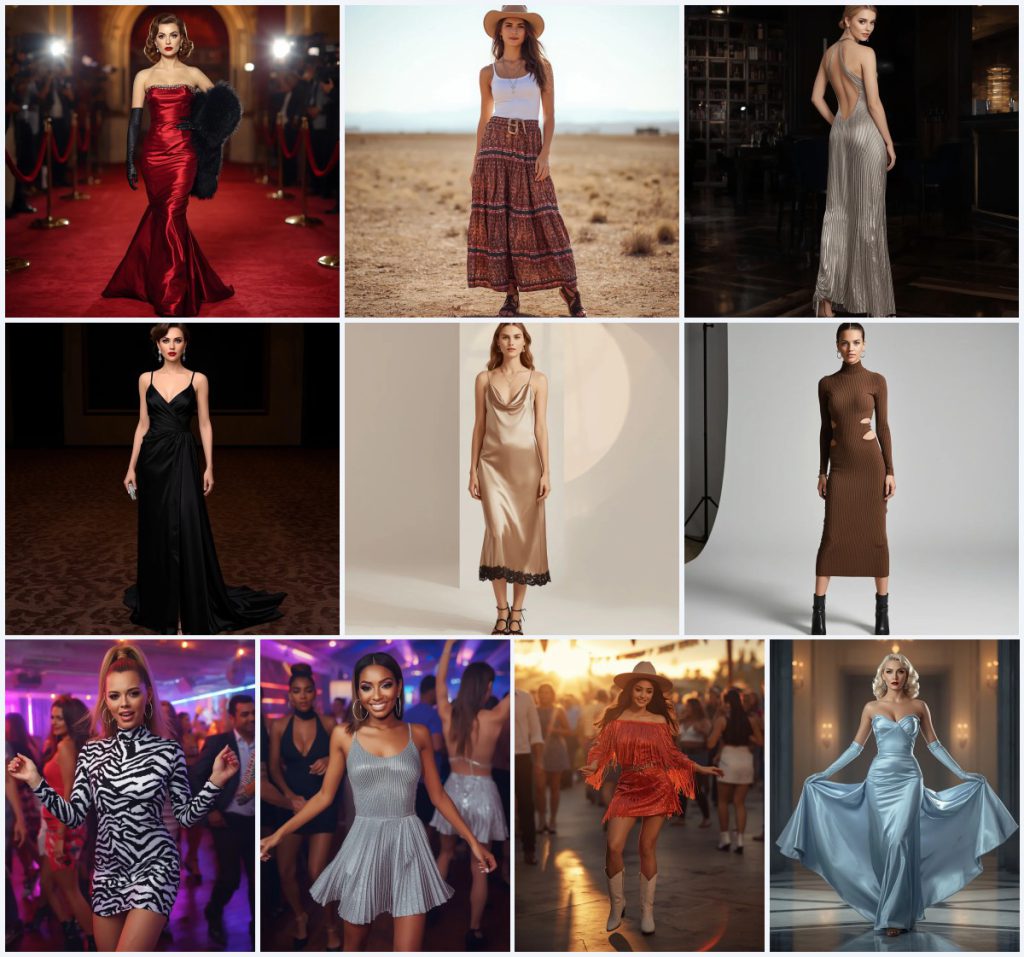
- A strapless, mermaid-cut gown in shimmering deep red lamé with crystal detailing and a black faux fur stole.
- A flowy, tiered maxi skirt in an earthy print paired with a simple white tank top and a wide-brimmed cowboy hat.
- A floor-length metallic silver pleated maxi dress with a halter neckline and an open back, creating a liquid silver effect.
- A champagne gold satin slip dress with a cowl neckline, thin spaghetti straps, and black lace trim along the hemline.
- A zebra print sequin mini dress with long sleeves and a high neckline, sparkling under dynamic neon lights.
- A short western party dress in sunset orange, entirely covered in shimmering fringe, paired with knee-high white cowboy boots.
Scene breakdown across these ten prompts
The scenes span glamorous evening affairs, sun-drenched open fields, and vibrant party lounges. In the Old Hollywood-inspired prompts, a woman walks down "a plush red carpet" with "flashing cameras and an opulent, art deco-inspired event backdrop," while another glides across "a polished art deco ballroom floor" with "soft and flattering" ambient lighting. These details root each image in a specific, luxurious moment.
Contrasting settings include "a sun-drenched open field with distant mountains" for the western look and "a lively outdoor dance floor during sunset" where the "setting sun casts a warm, golden glow." For the party-themed prompts, backgrounds become "a blurred, vibrant club interior with dynamic neon lights," emphasizing motion and energy through phrases like "dancing energetically" and "shimmers and sways beautifully."
Why these prompts work for AI image generation
These prompts succeed because they combine precise visual details with evocative moods, giving the AI clear direction while leaving room for artistic interpretation. By specifying fabric types, poses, lighting conditions, and background elements, they reduce ambiguity and increase the likelihood of generating cohesive, high-quality images that match the intended aesthetic.
- Fabric and texture specificity: Terms like "shimmering deep red lamé," "liquid silver effect," and "ribbed knit fabric" guide the AI to render realistic material properties and light interactions.
- Dynamic pose and context: Descriptions such as "walks confidently," "dancing energetically," and "sways dramatically" inject motion and life, preventing static, lifeless outputs.
- Mood-driven lighting: Prompts include lighting cues like "soft, romantic lighting," "dramatic lighting," and "warm, golden glow" to establish atmosphere and enhance the photorealistic quality.
Three artistic styles embedded in these prompts
This collection primarily leans on three cohesive artistic styles that enhance its fashion-focused narratives. The prompts consistently call for photorealistic rendering, editorial sophistication, and cinematic glamour, ensuring a unified visual language across all ten images while allowing each scene to shine individually.
- Photorealistic 8k: Every prompt ends with "photorealistic, 8k," pushing the AI to generate images with lifelike textures, sharp details, and high resolution suitable for professional use.
- High-fashion editorial: Several prompts, like the satin slip dress and knit midi dress, specify "high-fashion editorial shot" with clean studio backgrounds and dramatic or romantic lighting, mimicking magazine spreads.
- Cinematic vintage glamour: The Old Hollywood prompts evoke a cinematic feel with terms like "timeless elegance of 1950s Hollywood," finger waves, and art deco settings, creating a nostalgic, film-like quality.
How to generate images with this prompt collection
To bring these women's fashion stories to life, follow a structured approach that ensures the AI captures the intended details. Start by selecting one prompt from the collection that matches your creative vision, then refine the output through careful iteration and post-generation checks.
- Choose and copy the prompt. Pick a specific prompt, such as the "Golden Age Icon" or "Western Enthusiast," and copy its full text exactly as provided.
- Paste into your AI tool. Open your preferred AI image generator and paste the prompt into the text input field without any modifications initially.
- Upload a reference photo if needed. For consistent facial features or specific poses, upload a reference image of a model or pose that aligns with the prompt's description.
- Generate the initial set. Run the generation to produce four variations, using the default settings for photorealistic output in your chosen tool.
- Check hands and face. Inspect the results for common AI flaws like distorted fingers, asymmetrical eyes, or unnatural facial expressions, and discard any with these issues.
- Verify the main outfit details. Ensure the key garment—such as the "mermaid-cut gown" or "zebra print sequin mini dress"—is rendered accurately with correct colors, textures, and fit.
Reference photo guidance for these prompts
Using a reference photo can significantly improve the consistency and realism of your generated images. For this collection, select a reference that matches the described pose and mood without conflicting with the specified wardrobe, as the AI will prioritize the prompt's clothing details over the reference's attire.
- Choose a full-body or medium shot reference with a pose similar to "walks confidently" or "dancing energetically" to maintain the dynamic feel.
- Ensure the reference has neutral or minimal clothing so the AI can seamlessly overlay the prompt's detailed outfits like the "black satin draped gown" or "metallic silver pleated mini dress."
- Use a reference with soft, diffused lighting to avoid harsh shadows that might clash with the prompt's described lighting, such as the "warm, golden glow" or "soft, romantic lighting."
Recommended AI tools for this prompt collection
Different AI image generators excel at various aspects of these prompts. The table below compares four popular tools, highlighting their accessibility, typical realism, and specific usefulness for details found in this collection, such as the intricate crystal detailing or liquid silver effects.
| Tool | Access | Typical realism | Useful here for |
|---|---|---|---|
| ChatGPT | Subscription-based | High, with detailed prompts | Rendering the "shimmering deep red lamé fabric" with accurate light reflection on the red carpet scene. |
| Google Gemini | Free and paid tiers | Moderate to high | Capturing the "flowy, tiered maxi skirt in an earthy print" against the sun-drenched field background. |
| Leonardo AI | Freemium model | High, especially with fine-tuning | Generating the "liquid silver effect" of the metallic pleated maxi dress under dim party lounge lighting. |
| Midjourney | Subscription-based | Very high, cinematic quality | Producing the "intricate draping across the bodice" of the black satin gown in an opulent ballroom setting. |
Three expert tips for refining these prompts
To elevate the output quality, incorporate specific material and environmental details from the prompts into your generation strategy. These tips focus on enhancing realism and mood by leveraging the unique elements already present in the collection.
- Emphasize the "crystal detailing" on the red lamé gown by adding a secondary lighting source in your tool to make the embellishments sparkle more prominently.
- For the western-inspired look, use a depth-of-field effect to blur the "distant mountains" while keeping the cowboy hat and maxi skirt in sharp focus.
- When generating the zebra print sequin mini dress, increase the contrast and saturation slightly to make the sequins "sparkle brilliantly" against the neon lights.
Common issues and fixes for these prompts
Even with detailed prompts, AI image generators can produce flawed results. The table below identifies four frequent problems that may arise with this collection and provides direct solutions to correct them without altering the core prompt structure.
| Issue | What to change |
|---|---|
| Finger waves look like messy curls | Add "perfectly sculpted, glossy finger waves with defined ridges" to the prompt for the Old Hollywood styles. |
| Fringe on the sunset dress appears static | Include "fringe caught mid-sway with motion blur" to convey the dynamic dancing action. |
| Cowboy hat casts harsh shadows on the face | Adjust the lighting description to "soft, diffused sunlight from the side" to reduce facial shadows. |
| Sequin texture looks flat or painted on | Specify "individual reflective sequins with specular highlights" to achieve a true sparkling effect. |
Frequently Asked Questions
Can I mix elements from different prompts in this collection?
Yes, you can combine details like pairing the cowboy hat from the western prompt with the satin slip dress for a unique fusion look. Just ensure the lighting and background remain consistent to avoid visual clashes.
Why are some backgrounds blurred while others are sharp?
The prompts specify blurred backgrounds, such as "a blurred, vibrant club interior," to simulate depth of field and focus attention on the subject. This mimics professional photography techniques and enhances the editorial feel.
How do I ensure the AI generates the correct vintage hairstyles?
For styles like finger waves, use additional descriptors like "1920s-inspired sculpted waves" if the initial output is inaccurate. Referencing a specific era helps the AI understand the geometric precision required.
Conclusion
This collection of ten AI image prompts offers a rich tapestry of women's fashion stories, from the golden age of Hollywood to contemporary party scenes. By leveraging the detailed scene descriptions, specific fabric and accessory notes, and mood-driven lighting, you can generate striking, photorealistic images that capture the essence of each narrative. Experiment with the provided tips and tool recommendations to push the creative boundaries of your AI art, and remember that small tweaks can transform a good result into a breathtaking one.
Remember to only use and edit a reference photo that you have the legal right to modify, ensuring your creative process respects copyright and ownership.